Windows AppResolver LPE: From AppContainer to SYSTEM
Exploit development for a Windows AppResolver authorization issue fixed in July 2026, from a zero-capability AppContainer to an interactive SYSTEM shell.
On this page
Executive Summary
While diffing the July 2026 Windows security update, I found a new authorization
check in Windows.UI.Storage.dll. The affected method belongs to the private
WinRT class
Windows.Internal.AppResolver.AppResolverActivationArgsFactory. Before the
update, a process running in an AppContainer with no capabilities could ask this
factory to construct an AppResolver object from caller-supplied launch data.
That object could then make an attacker-controlled ProgID the protected default
handler for ms-settings:.
I turned that behavior into an end-to-end proof of concept. It starts from the
ordinary filtered token of a local administrator, creates the protected
association from a zero-capability AppContainer, and launches the registered
handler through the auto-elevated fodhelper.exe. This yields a High-integrity
administrator process without a UAC prompt. The PoC then creates a temporary
service and uses its SYSTEM token to open an interactive command prompt in the
signed-in user’s session.
This is not a standard-user-to-SYSTEM exploit. The starting account must already belong to the local Administrators group, and the final High-to-SYSTEM step uses the expected service-control rights of an elevated administrator. The security boundary crossed by the AppResolver primitive is the AppContainer capability check; its practical use in this chain is a UAC bypass.
I compared the vulnerable and updated binaries and ran the same trigger on both systems. These are the builds I validated:
| State | OS build | Windows.UI.Storage.dll |
|---|---|---|
| Vulnerable | 26200.8737 | 10.0.26100.8737 |
| Updated | 26200.8875 | 10.0.26100.8875 |
On build 26200.8737, the factory accepted the zero-capability caller and a
protected association was created. On build 26200.8875, the same call returned
E_ACCESSDENIED before an AppResolver object was returned.
Attribution note: Microsoft’s public record for CVE-2026-50454 describes Windows User Interface Core relative path traversal (CWE-23) leading to arbitrary system-file deletion. The PoC in this article does not use relative path traversal and does not reproduce file deletion. It proves a missing AppResolver capability check in the same component, fixed by the same update, with a clean vulnerable-versus-updated runtime result. Without Microsoft’s private case details, I cannot claim that this is the root cause assigned to CVE-2026-50454. It may be another consequence of the same issue, an adjacent issue closed by the update, or a defense-in-depth change.
The public version ranges and CVSS data are available in the Microsoft advisory and NVD record.
Credits
Microsoft credits the following researchers for CVE-2026-50454:
- @2st___ of Diffract
- Zhiniang Peng with HUST
- Thanatos Tian of Diffract
- Anonymous
- Daniel Friedl
Background
Registration is not selection
Windows uses protocol associations to decide which application handles a URI.
For example, ms-settings: normally opens Windows Settings. A desktop
application can register itself as a candidate protocol handler under the
current user’s registry hive, but registration is not supposed to make it the
default automatically. The selection is meant to remain a user decision.
Microsoft describes that model in its
Default Programs documentation.
Recent Windows versions store the selected handler in a protected UserChoice
or UserChoiceLatest key. Alongside the ProgID, Windows stores a validation
hash. Simply writing a ProgID under HKCU does not produce a valid choice; the
association machinery rejects a missing or invalid hash.
That distinction is the useful part of this bug. The question is not whether a user can write a registry value beneath HKCU. The question is whether an untrusted caller can persuade trusted Windows code to create a valid protected choice for metadata supplied by that caller.
The private AppResolver interface
Windows.UI.Storage.dll implements the private activation class:
Windows.Internal.AppResolver.AppResolverActivationArgsFactoryIts CreateAppResolverActivationArgs method accepts an IInspectable
representing a pending launch and returns an AppResolver activation-arguments
object. The contract is not a public API, but the class and method names are
present in public symbols.
For the protocol path used by the PoC, the input object exposes the following shape:
IPendingLaunch  + IPendingProtocolLaunch      get_Scheme()  -> "ms-settings"      get_Uri()     -> "ms-settings:"  + IPendingLaunch2      get_LaunchProviders() -> vector of IExtensionInfo
IExtensionInfo  get_AppUserModelId()  get_ProgId()      -> attacker-controlled ProgID  get_DisplayName()  get_ApplicationIcon()
The returned activation arguments expose each provider as a
CAppResolverApplication. Its SetAsDefault method is the bridge between the
caller-supplied object graph and Windows’ protected association state.
Why I used a zero-capability AppContainer
The caller identity is the key to the patch. I did not run the trigger as an
ordinary desktop process. The launcher creates a temporary AppContainer
profile, supplies no capability SIDs, and starts trigger.exe with
PROC_THREAD_ATTRIBUTE_SECURITY_CAPABILITIES. The resulting process reports:
TOKEN_IS_APPCONTAINER=1TOKEN_INTEGRITY=0x1000This gives the comparison a precise boundary: both systems receive the same private-interface call from a real AppContainer token with no capabilities. The launcher removes the temporary profile after the trigger exits. No MSIX, certificate, or package installation is involved.
Vulnerability Details
The fixing diff
The semantic diff made the affected factory method stand out:
CAppResolverActivationArgsFactory::CreateAppResolverActivationArgs vulnerable: 67 bytes, 21 instructions updated: 253 bytes, 67 instructionsThe older implementation effectively constructs the activation-arguments object without first authorizing the caller:
HRESULT CreateAppResolverActivationArgs( IInspectable *pending, IAppResolverActivatedArgs **result){ return MakeAndInitialize<CAppResolverActivatedArgs>(result, pending);}The updated function calls
wil::CheckCapabilityForClientOfObject_nothrow twice. The two new capability
names embedded in the function are applicationDefaults and
shellExperience. Reduced to pseudocode, the new control flow is:
bool allowed = false;
RETURN_IF_FAILED(CheckCapabilityForClientOfObject_nothrow(    this, L"applicationDefaults", &allowed));
if (!allowed) {    RETURN_IF_FAILED(CheckCapabilityForClientOfObject_nothrow(        this, L"shellExperience", &allowed));}
if (!allowed)    return E_ACCESSDENIED;
return MakeAndInitialize<CAppResolverActivatedArgs>(result, pending);
The capabilities form an OR condition: either one authorizes object creation.
A caller with neither is rejected before CAppResolverActivatedArgs is
constructed.
Reaching protected association state
The PoC implements the required private interfaces and returns a protocol
launch type, the ms-settings scheme and URI, and a one-element provider
vector. The provider identifies the ProgID that run.ps1 registers for the
current user.
On the older build, the factory accepts this graph and returns activation arguments. The trigger enumerates the provider application and calls:
IAppResolverApplication *application = /* provider returned by the factory */;HRESULT hr = application->SetAsDefault();The important result is not merely S_OK. Windows writes the selected ProgID
and a valid hash to the protected association key. A representative readback
looks like this:
Protected association: ProgId=CVE50454.Shell Hash=<valid hash>The per-user handler registration and the protected default now agree.
Resolving ms-settings: follows the PoC handler instead of the normal Settings
target.
Runtime comparison
I ran the same trigger on both builds:
| Observation | 26200.8737 | 26200.8875 |
|---|---|---|
| AppContainer token | yes, IL 0x1000 | yes, IL 0x1000 |
RoGetActivationFactory | S_OK | S_OK |
CreateAppResolverActivationArgs | S_OK | E_ACCESSDENIED |
| returned args object | non-null | null |
| protected association created | yes | no |
The factory remains activatable on the updated system. What changed is the
authorization decision inside CreateAppResolverActivationArgs, which matches
the new capability checks in the binary.
I also tested a full-trust desktop caller during development. It could still
reach SetAsDefault on the updated build. That is not a patch bypass: a
full-trust desktop process and an AppContainer present different client
identities to this factory. The final PoC therefore creates an actual
zero-capability AppContainer and treats rejection at the factory as the fixed
result.
What this does not establish
The observed check is an authorization check, whereas the CVE record names relative path traversal. I found no relative-path field in the exploit chain described here, and I did not reproduce arbitrary file deletion. A different pending-launch field may reach the published deletion sink, or the capability guard may have been added to close several downstream routes at once. Those are possibilities, not findings.
The result I can support is narrower: build 26200.8737 lets a zero-capability AppContainer construct this privileged AppResolver object and turn controlled provider metadata into protected association state; build 26200.8875 rejects the same operation at a newly added capability check.
Exploitability Analysis
From the AppContainer primitive to High integrity
The useful chain is short:
filtered local administrator, Medium IL | | launches zero-capability AppContainer trigger vAppContainer process, Low IL | | factory accepts crafted launch/provider objects vprotected ms-settings default -> attacker ProgID | | auto-elevated fodhelper.exe resolves ms-settings: vattacker handler, High ILThe user first registers a protocol handler under HKCU. The vulnerable call
then makes it the valid protected default for ms-settings:. When
fodhelper.exe resolves that protocol as part of its normal startup, it starts
the registered PowerShell command with the user’s full administrator token and
without a consent prompt.
This is where the actual security impact of the primitive appears: a process that began with the administrator’s filtered Medium-integrity token obtains a High-integrity process. It does not grant administrative rights to an account that did not already have them.
From High integrity to an interactive SYSTEM shell
Once the handler is running High, it creates a temporary demand-start service
whose image is system_shell.exe. Service Control Manager starts that image as
NT AUTHORITY\SYSTEM.
A service normally runs in Session 0, so starting cmd.exe directly would not
put a window on the user’s desktop. system_shell.exe instead:
- duplicates its own SYSTEM token as a primary token;
- obtains the active console session with
WTSGetActiveConsoleSessionId; - applies that session ID to the duplicate token;
- selects
winsta0\default; and - launches
cmd.exewithCreateProcessAsUserW.
The visible shell therefore keeps the SYSTEM identity while appearing in the interactive console session. The launcher writes an identity file as a second success signal:
nt authority\systemMandatory Label\System Mandatory LevelThe PoC deletes the temporary service after the shell starts. The command prompt remains open until the tester closes it.
Reliability and constraints
There is no race, heap grooming, or build-specific code offset in the PoC. On the vulnerable system I tested, the factory transition and the complete shell chain were deterministic. The scripts use bounded waits for the protected registry state and child processes, and normal execution cleans up the temporary registration, AppContainer profile, association, and service.
The chain still has clear environmental requirements:
- the starting account must be a local administrator running with its normal filtered token;
- UAC and the relevant auto-elevation behavior must be enabled;
- the target component must contain the older factory implementation;
- an existing per-user
ms-settingschoice must not be present—the script refuses to replace one; and - application control or endpoint policy may independently block PowerShell, AppContainer creation, service creation, or the child-process chain.
Because the test changes protocol-association state and executes as SYSTEM, it belongs on a disposable VM. An abrupt termination can also interrupt cleanup.
Proof of Concept
Demo and source
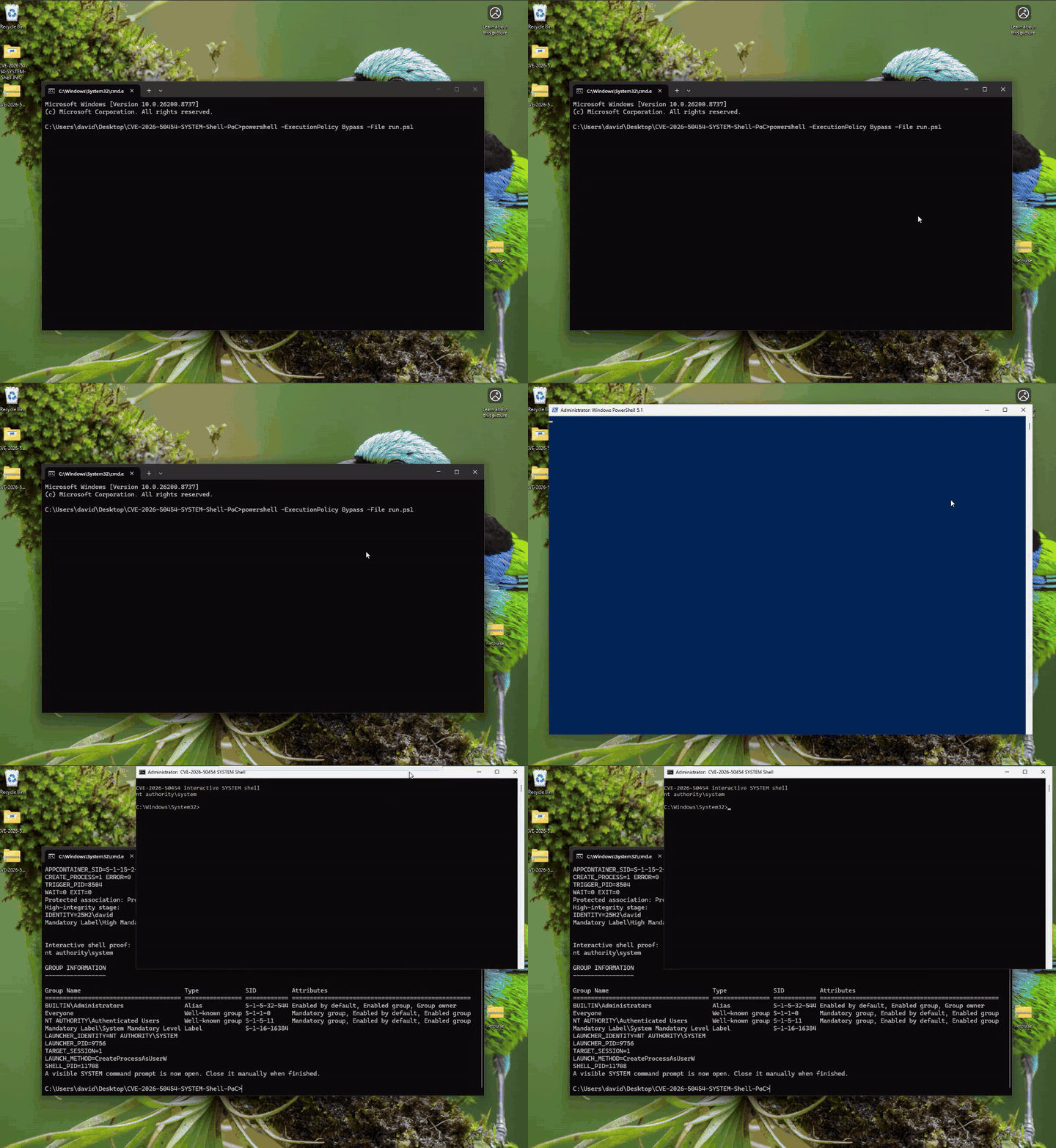
The source-only PoC is available in the Windows AppResolver LPE PoC repository.
Requirements
- x64 Windows 11; I validated build 26200.8737 as vulnerable;
- a local Administrators-group account in a normal, non-elevated PowerShell window;
- UAC and auto-elevation enabled;
- an interactive console session;
- no existing per-user
ms-settingsdefault association; and - Visual Studio or Visual Studio Build Tools with Desktop development with C++ and a Windows SDK.
The repository contains source code only. Build the three binaries before running the PoC:
.\build.ps1The build script discovers the installed Visual Studio toolchain and compiles
trigger.exe, appcontainer_launcher.exe, and system_shell.exe as x64
binaries.
Now remain in the same non-elevated PowerShell window and run:
Set-ExecutionPolicy -Scope Process Bypass.\run.ps1On the vulnerable build, the script prints the protected association and opens
a command prompt titled CVE-2026-50454 SYSTEM Shell. Verify it inside the new
window:
whoamiwhoami /groupsExpected identity:
nt authority\systemClose the SYSTEM command prompt manually when finished. Normal script cleanup removes the temporary service, protocol registration, protected association, and AppContainer profile.
On the updated build, the trigger should fail before the protected association
is created. The diagnostic log at
C:\Users\Public\CVE50454\appcontainer_result.txt should include:
CREATE_ARGS_HRESULT=0x80070005No elevated handler or SYSTEM shell should start.
Remediation
Install the July 2026 security update or a later cumulative update. For the Windows 11 25H2 systems I tested, build 26200.8875 contains the capability check that blocks this trigger.
The required invariant is that the factory must authorize the client of the WinRT object before constructing an AppResolver object that can modify default association state. Checking only whether activation or object construction succeeds does not protect the boundary. The updated implementation follows this pattern:
HRESULT CreateAppResolverActivationArgs(    IInspectable *pending,    IAppResolverActivatedArgs **result){    RETURN_HR_IF(E_INVALIDARG, result == nullptr);    *result = nullptr;
    bool allowed = false;    RETURN_IF_FAILED(CheckCapabilityForClientOfObject_nothrow(        this, L"applicationDefaults", &allowed));
    if (!allowed) {        RETURN_IF_FAILED(CheckCapabilityForClientOfObject_nothrow(            this, L"shellExperience", &allowed));    }
    RETURN_HR_IF(E_ACCESSDENIED, !allowed);    return MakeAndInitialize<CAppResolverActivatedArgs>(result, pending);}
The strongest defense in depth would repeat the authorization decision at the
state-changing SetAsDefault sink. Private interface implementations supplied
across a trust boundary should also be treated as hostile: launch type, scheme,
provider count, ProgID, and path fields should be validated before anything is
persisted. Reserved schemes such as ms-settings deserve a stricter policy
than ordinary third-party protocol handlers.
Regression coverage should include:
- a zero-capability AppContainer, which must receive
E_ACCESSDENIEDand no returned arguments object; - callers holding either
applicationDefaultsorshellExperience, tested separately; - a full-trust desktop caller, kept separate from the AppContainer case;
- verification that rejection leaves
UserChoiceandUserChoiceLatestabsent; and - malformed and relative file/protocol launch fields, to cover the public CWE-23 description as well as the capability boundary.
Removing unnecessary local administrator membership and enforcing stricter application-control or UAC policy reduces the reach of this specific chain, but those measures do not replace the component update.
Summary
I found that the older Windows.UI.Storage.dll factory constructed a powerful
AppResolver object for a zero-capability AppContainer without first checking
the caller. By supplying the protocol and provider objects expected by the
private interface, I could use SetAsDefault to create a valid protected
selection for an attacker-controlled ms-settings handler.
That state turns the primitive into a practical UAC bypass for a filtered local
administrator. fodhelper.exe starts the selected handler at High integrity,
and the PoC uses the resulting administrator token to create a temporary
service and place an interactive SYSTEM shell in the console session.
The updated build provides a precise negative result: activation still works,
but CreateAppResolverActivationArgs returns E_ACCESSDENIED, no arguments
object is returned, and no protected association is created.
What remains unresolved is CVE attribution. This capability-check differential appeared in the July 2026 update that also addresses CVE-2026-50454, but the public CVE describes relative path traversal and file deletion rather than the behavior shown here. Until Microsoft confirms the relationship, I would publish the runtime and binary evidence as an AppResolver issue fixed by the July 2026 update, not as proof that this PoC reproduces the advisory’s stated root cause.